The Concord Consortium has developed hundreds of STEM simulations to engage students in the NGSS science and engineering practices—from asking questions and defining problems to developing and using models, planning and carrying out investigations, and analyzing and interpreting data. These simulations—covering everything from genetics to plate tectonics, diffusion, protein folding, the underpinnings of AI, and many others—are complex models with elaborate dynamic visual and data display feedback.
Our expert team of software engineers encode fundamental scientific principles into the underlying software so that the simulations behave in ways that model the real world, and our educational designers make sure the simulations inspire student inquiry. Each simulation is a complicated web application unto itself, richer and more nuanced than a standalone web page.
That complexity is what makes simulation accessibility both challenging and essential.
Accessibility guidelines and requirements
An update to Title II of Americans with Disabilities Act requires public entities to ensure their web-based instructional materials meet Web Content Accessibility Guidelines (WCAG). Educational technology providers must provide VPAT forms to districts detailing the ways in which their products are accessible, or plans to be so. Districts serving more than 50,000 residents must comply by April 24, 2026. Smaller districts must comply by April 24, 2027.
While WCAG defines how to make web content more accessible—from providing alt text for images to properly labeling form input areas—these guidelines offer less obvious guidance for simulations. Simulations are not static web pages. They are dynamic, interactive systems, often relying on visual cues to help students develop insight and evidence.
Designing simulations that are accessible to more users requires reengineering how dynamic visuals, real-time feedback, and interactive controls are structured and reported so they can be meaningfully interpreted and navigated by screen readers, keyboard users, and assistive technologies. The question is not simply how to retrofit accessibility into simulations, but even more, how to design the experience so every learner can fully participate in dynamic scientific inquiry.
With seed funding from Cisco Foundation and the Valhalla Foundation, we are partnering with two organizations, Prime Access Consulting, which is run by an award-winning computer scientist who is blind, and accessiBe, an accessibility firm dedicated to inclusive web experiences. Together, we are reviewing our STEM resources with the goal of producing Voluntary Product Accessibility Templates (VPATs) to demonstrate the ways our resources meet WCAG standards, and leveraging emerging technologies and advances in accessibility practice to expand what is possible in accessible STEM simulations.
Reimagining accessible STEM simulations
Consider how simulations differ from other web content. In inquiry-based simulations based on first principles, the “content” isn’t fixed like a pre-recorded video or a simple image. State changes are continuous and random. Cause and effect relationships can be spatial and temporal. The data and images presented on the screen are the product of interactions between student-controlled variables and programmed elements. Results emerge based on the underlying mathematical and scientific rules and properties.
Furthermore, students interact with simulations to take measurements, change parameters and perspectives, and otherwise make sense of the scientific phenomena being modeled.
Students adjust parameters in a simulation (e.g., changing the number of hawks in an ecosystem, the amount of sunlight a plant gets, or the volume of a container) to explore the relationships and make sense of them. In response to their actions, visual and data elements change. For example, a student watching a population graph shift as they move a slider is processing information in a particular way, but there is no obvious equivalent in a screen reader’s sequential text output that would support similar student sensemaking.
Simulation affordances
We have already tackled a number of challenges to make rich visual science environments accessible through our research and development of simulations, including our work with the state of Massachusetts on their innovative 5th and 8th grade performance task assessments and with the FOSS Next Generation curricular program.
Several categories of affordances have emerged as essential:
- Color and contrast: Choosing palettes that work for colorblind and low-vision users, not just typically sighted ones.
- Redundant labeling: Adding text alongside icons, color coding, and shape cues so that no single channel carries meaning alone or strictly visually.
- Keyboard-accessible interactions: Replacing drag-and-drop with click-to-pick/click-to-place and making sliders navigable as a series of key stops.
- Descriptions and captions: Providing content descriptions for images and visual states, made available to screen readers and read-aloud tools.
- Live announcements: Updating text, counts, and labels that announce themselves as changing, so low-vision users can follow animated state changes over time.
- Responsive layout: Wrapping and resizing controls and images as simulations are zoomed in the browser.
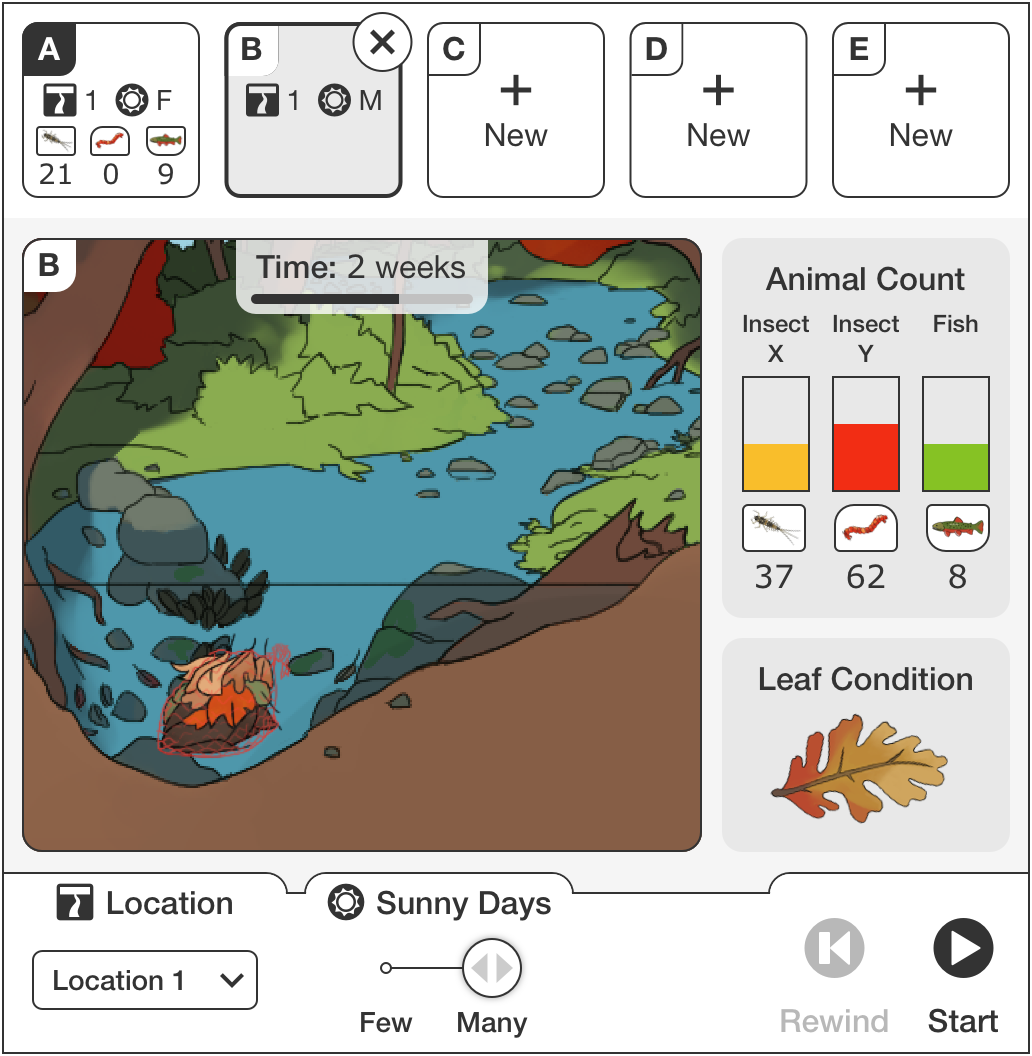 Example Massachusetts Department of Elementary and Secondary Education 5th grade performance assessment where the student must interact with the simulation to determine how energy flows through the river ecosystem.
Accessibility-driven interaction design supports all learners
Accessibility affordances often reveal themselves to be general usability affordances. The design interventions described above also benefit English language learners, students with older or less functional hardware, or students who learn better with multiple modalities.
The clearest example is our click-to-pick/click-to-place interaction. We introduced it as a keyboard-accessible alternative to drag-and-drop, but it quickly became the preferred interaction for many students. The reason is practical: a large proportion of students use low-end Chromebooks with small or unresponsive touchpads rather than mice. For these students precise drag-and-drop is frustrating. Young learners still developing fine motor skills also benefit from the new interaction pattern. Some students prefer keyboard accessible actions, and some are using screen readers. The accessible alternative with distinct named interaction states turned out to be better for everyone.
Read-aloud technologies are another example of universal benefit. Readable descriptions of simulation contents and affordances also makes that secondary presentation available to the read-aloud tools that improve comprehension for all students, and are especially valuable for English language learners. These tools have become so widely valued that the latest version of Chrome now includes built-in read-aloud functionality—which means our investment in making simulation text accessible to assistive technology pays dividends for the entire user base.
Next steps
We will continue enhancing features across our STEM resources to expand access to inquiry-driven simulations and strengthen the accessibility of interactive learning. If you need a VPAT for your district, please contact us at licensing@concord.org. If you would like to explore how our simulation design expertise can help meet your business or organization goals, please contact hello@concord.org.